

right?
-
论坛似了,对吗 -
我下辈子不碰Network!!!!! -
我下辈子不碰Network!!!!!
WCNMDWCNMDWCNMDWCNMDWCNMDWCNMDWCNMDWCNMDWCNMDWCNMDWCNMDWCN
MDWCNMDWCNMDWCNMDWCNMDWCNMDWCNMDWCNMDWCNMDWCNMDWCNMDWCNMDW
CNMDWCNMDWCNMDWCNMDWCNMDWCNMDWCNMDWCNMDWCNMDWCNMDWCNMDWCNM
DWCNMDWCNMDWCNMDWCNMDWCNMDWCNMDWCNMDWCNMDWCNMDWCNMDWCNMDWC
NMDWCNMDWCNMDWCNMDWCNMDWCNMDWCNMDWCNMDWCNMDWCNMDWCNMDWCNMD
WCNMDWCNMDWCNMDWCNMDWCNMDWCNMDWCNMDWCNMDWCNMDWCNMDWCNMDWCN
MDWCNMDWCNMDWCNMDWCNMDWCNMDWCNMDWCNMDWCNMDWCNMDWCNMDWCNMD 啊卧槽麻将怎么这么坏啊卧槽麻将怎么这么坏啊卧槽麻将怎么这么坏啊卧槽麻将怎么这么坏
啊卧槽麻将怎么这么坏啊卧槽麻将怎么这么坏啊卧槽麻将怎么这么坏啊卧槽麻将怎么这么坏
啊卧槽麻将怎么这么坏啊卧槽麻将怎么这么坏啊卧槽麻将怎么这么坏啊卧槽麻将怎么这么坏
啊卧槽麻将怎么这么坏啊卧槽麻将怎么这么坏啊卧槽麻将怎么这么坏啊卧槽麻将怎么这么坏
啊卧槽麻将怎么这么坏啊卧槽麻将怎么这么坏啊卧槽麻将怎么这么坏啊卧槽麻将怎么这么坏
啊卧槽麻将怎么这么坏啊卧槽麻将怎么这么坏啊卧槽麻将怎么这么坏啊卧槽麻将怎么这么坏
啊卧槽麻将怎么这么坏啊卧槽麻将怎么这么坏啊卧槽麻将怎么这么坏啊卧槽麻将怎么这么坏
啊卧槽麻将怎么这么坏啊卧槽麻将怎么这么坏啊卧槽麻将怎么这么坏啊卧槽麻将怎么这么坏
啊卧槽麻将怎么这么坏啊卧槽麻将怎么这么坏啊卧槽麻将怎么这么坏啊卧槽麻将怎么这么坏
啊卧槽麻将怎么这么坏啊卧槽麻将怎么这么坏啊卧槽麻将怎么这么坏啊卧槽麻将怎么这么坏
啊卧槽麻将怎么这么坏啊卧槽麻将怎么这么坏啊卧槽麻将怎么这么坏啊卧槽麻将怎么这么坏
啊卧槽麻将怎么这么坏啊卧槽麻将怎么这么坏啊卧槽麻将怎么这么坏啊卧槽麻将怎么这么坏
啊卧槽麻将怎么这么坏啊卧槽麻将怎么这么坏啊卧槽麻将怎么这么坏啊卧槽麻将怎么这么坏
啊卧槽麻将怎么这么坏啊卧槽麻将怎么这么坏啊卧槽麻将怎么这么坏啊卧槽麻将怎么这么坏
啊卧Forge怎么这么坏啊卧槽Forge怎么这么坏啊卧槽Forge怎么这么坏啊卧槽Forge怎么这么坏
啊卧Forge怎么这么坏啊卧槽Forge怎么这么坏啊卧槽Forge怎么这么坏啊卧槽Forge怎么这么坏
啊卧Forge怎么这么坏啊卧槽Forge怎么这么坏啊卧槽Forge怎么这么坏啊卧槽Forge怎么这么坏
啊卧Forge怎么这么坏啊卧槽Forge怎么这么坏啊卧槽Forge怎么这么坏啊卧槽Forge怎么这么坏
啊卧Forge怎么这么坏啊卧槽Forge怎么这么坏啊卧槽Forge怎么这么坏啊卧槽Forge怎么这么坏
啊卧Forge怎么这么坏啊卧槽Forge怎么这么坏啊卧槽Forge怎么这么坏啊卧槽Forge怎么这么坏
啊卧Forge怎么这么坏啊卧槽Forge怎么这么坏啊卧槽Forge怎么这么坏啊卧槽Forge怎么这么坏
啊卧Forge怎么这么坏啊卧槽Forge怎么这么坏啊卧槽Forge怎么这么坏啊卧槽Forge怎么这么坏
啊卧Forge怎么这么坏啊卧槽Forge怎么这么坏啊卧槽Forge怎么这么坏啊卧槽Forge怎么这么坏
啊卧Forge怎么这么坏啊卧槽Forge怎么这么坏啊卧槽Forge怎么这么坏啊卧槽Forge怎么这么坏
啊卧Forge怎么这么坏啊卧槽Forge怎么这么坏啊卧槽Forge怎么这么坏啊卧槽Forge怎么这么坏
啊卧Forge怎么这么坏啊卧槽Forge怎么这么坏啊卧槽Forge怎么这么坏啊卧槽Forge怎么这么坏
啊卧Forge怎么这么坏啊卧槽Forge怎么这么坏啊卧槽Forge怎么这么坏啊卧槽Forge怎么这么坏
啊卧Forge怎么这么坏啊卧槽Forge怎么这么坏啊卧槽Forge怎么这么坏啊卧槽Forge怎么这么坏
啊卧Forge怎么这么坏啊卧槽Forge怎么这么坏啊卧槽Forge怎么这么坏啊卧槽Forge怎么这么坏
啊卧Forge怎么这么坏啊卧槽Forge怎么这么坏啊卧槽Forge怎么这么坏啊卧槽Forge怎么这么坏
啊卧Forge怎么这么坏啊卧槽Forge怎么这么坏啊卧槽Forge怎么这么坏啊卧槽Forge怎么这么坏
啊卧Forge怎么这么坏啊卧槽Forge怎么这么坏啊卧槽Forge怎么这么坏啊卧槽Forge怎么这么坏
啊卧Forge怎么这么坏啊卧槽Forge怎么这么坏啊卧槽Forge怎么这么坏啊卧槽Forge怎么这么坏
啊卧Forge怎么这么坏啊卧槽Forge怎么这么坏啊卧槽Forge怎么这么坏啊卧槽Forge怎么这么坏
啊卧Forge怎么这么坏啊卧槽Forge怎么这么坏啊卧槽Forge怎么这么坏啊卧槽Forge怎么这么坏
啊卧Forge怎么这么坏啊卧槽Forge怎么这么坏啊卧槽Forge怎么这么坏啊卧槽Forge怎么这么坏
啊卧Forge怎么这么坏啊卧槽Forge怎么这么坏啊卧槽Forge怎么这么坏啊卧槽Forge怎么这么坏
啊卧Forge怎么这么坏啊卧槽Forge怎么这么坏啊卧槽Forge怎么这么坏啊卧槽Forge怎么这么坏
啊卧Forge怎么这么坏啊卧槽Forge怎么这么坏啊卧槽Forge怎么这么坏啊卧槽Forge怎么这么坏
啊卧Forge怎么这么坏啊卧槽Forge怎么这么坏啊卧槽Forge怎么这么坏啊卧槽Forge怎么这么坏 -
[原创][数据包][持续更新]NuQuest模组中的对话框使用示例很多人在催这玩意,但是也有人不知道这玩意怎么用,那我今天来教教大家吧。
数据包路径
关于数据包的路径存放
目前的路径是在nu_quest/dialog下的
完整路径就是data/nu_quest/dialog
代码会自动检测这个路径下的全部文件,包括子文件夹,所以大可放心整理问题。编写数据包
那现在我们就来介绍如何写对话了
{
  "dialogueId": "intro",
  "dialogTexts": [
    {
      "title": "dialog.nuquest.intro.title",
      "text": "dialog.nuquest.intro.text",
      "imageGroup": {
        "image": "foo:textures/gui/npc.png",
        "x": "0",
        "y": "(screenheight / 3 * 2) - 64",
        "width": 64,
        "height": 64,
        "uOffset": 0,
        "vOffset": 0,
        "uWidth": 64,
        "vHeight": 64,
        "textureWidth": 64,
        "textureHeight": 64
      },
      "soundGroup": {
        "sound": "minecraft:entity.villager.yes",
        "volume": 1.0,
        "pitch": 1.0
      },
      "textEffect": {
        "name": "typewriter"
      },
      "params": {
        "speed": 2
      }
    }
  ],
  "dialogActionDatas": [
    {
      "message": "dialog.nuquest.intro.continue",
      "action": {
        "name": "dialog",
        "params": {
          "dialogId": "foo:intro_2"
        }
      }
    },
    {
      "message": "dialog.nuquest.intro.exit",
      "action": {
        "name": "close"
      }
    }
  ]
}
这是目前对话中可用的全部功能
在最外级的json元素中主要有三个,分别是dialogueId,dialogTexts,dialogActionDatas
dialogueId定义了这个动画的id名,调用时也是通过id名来查找,而dialogTexts是一个列表,里面存放了对话的文本内容,dialogActionDatas是选项按钮,在对话文字全部播放完后则会出现。 -
[原创][Mod]通过特定格式文字进行查找结构故事的起因是有帮twf写模组时,需要用到查找结构指令显示坐标给玩家,但是玩家不一定有权限或者ftbq发送并不会sendmessage给玩家,所以有了此代码。
我也将结构查找的功能写成了一个类,可以直接拿去用。public class StructureLocator { private static final ResourceKey<Registry<ConfiguredStructureFeature<?, ?>>> STRUCTURE_REGISTRY_KEY = Registry.CONFIGURED_STRUCTURE_FEATURE_REGISTRY; /** * 根据单个结构 ResourceLocation(如 "minecraft:village" 或者自定义 mod:id)查找最近的那个点。 * * @param level 当前维度 * @param center 中心搜索点 * @param id 结构的 ResourceLocation * @param radius 搜索半径(方块数) * @param skipKnown 是否跳过已探索过的结构 * @return 如果找到,返回 Pair(结构坐标, Holder<该结构>); 找不到则 empty() */ public static Optional<Pair<BlockPos, Holder<ConfiguredStructureFeature<?, ?>>>> findNearest( ServerLevel level, BlockPos center, ResourceLocation id, int radius, boolean skipKnown ) { Registry<ConfiguredStructureFeature<?, ?>> registry = level.registryAccess().registryOrThrow(STRUCTURE_REGISTRY_KEY); ResourceKey<ConfiguredStructureFeature<?, ?>> key = ResourceKey.create(STRUCTURE_REGISTRY_KEY, id); Holder<ConfiguredStructureFeature<?, ?>> holder = registry.getHolder(key).orElse(null); if (holder == null) return Optional.empty(); HolderSet<ConfiguredStructureFeature<?, ?>> holderSet = HolderSet.direct(holder); Pair<BlockPos, Holder<ConfiguredStructureFeature<?, ?>>> result = level.getChunkSource() .getGenerator() .findNearestMapFeature(level, holderSet, center, radius, skipKnown); return Optional.ofNullable(result); } /** * 根据 TagKey(像 "#minecraft:village")来查找最近的结构。 * * @param level 当前维度 * @param center 中心搜索点 * @param tagKey 结构 TagKey(Registry.CONFIGURED_STRUCTURE_FEATURE_REGISTRY 下的 Tag) * @param radius 搜索半径 * @param skipKnown 是否跳过已探索结构 * @return 如果找到,返回 Pair(结构坐标, Holder<该结构>); 找不到则 empty() */ public static Optional<Pair<BlockPos, Holder<ConfiguredStructureFeature<?, ?>>>> findNearestByTag( ServerLevel level, BlockPos center, TagKey<ConfiguredStructureFeature<?, ?>> tagKey, int radius, boolean skipKnown ) { Registry<ConfiguredStructureFeature<?, ?>> registry = level.registryAccess().registryOrThrow(STRUCTURE_REGISTRY_KEY); HolderSet<ConfiguredStructureFeature<?, ?>> holderSet = registry.getOrCreateTag(tagKey); Pair<BlockPos, Holder<ConfiguredStructureFeature<?, ?>>> result = level.getChunkSource() .getGenerator() .findNearestMapFeature(level, holderSet, center, radius, skipKnown); return Optional.ofNullable(result); } /** * 把查到的结果格式化成一个聊天用的组件(绿色坐标 + 距离)。 * * @param structureName 你想显示的结构名称(如 "minecraft:village" 或 "#minecraft:village") * @param origin 搜索中心 * @param pair findNearest 返回的 Pair * @param translateKey 翻译 key,通常用 "commands.locate.success" */ public static Component formatLocateResult( String structureName, BlockPos origin, Pair<BlockPos, Holder<ConfiguredStructureFeature<?, ?>>> pair, String translateKey ) { BlockPos found = pair.getFirst(); int distance = Mth.floor( dist(origin.getX(), origin.getZ(), found.getX(), found.getZ()) ); MutableComponent coords = ComponentUtils.wrapInSquareBrackets( new TranslatableComponent("chat.coordinates", found.getX(), "~", found.getZ()) ); return new TranslatableComponent( translateKey, structureName, coords, distance ); } private static float dist(int x1, int z1, int x2, int z2) { int dx = x2 - x1, dz = z2 - z1; return Mth.sqrt((float) (dx * dx + dz * dz)); } }这部分代码就是查找结构有关的类了,通过获取ConfiguredStructureFeature的注册表,然后再获取结构的Holder类,再给ChunkGenerator的findNearestMapFeature方法去获取到BlockPos。
@Mixin(ServerPlayer.class)
public class ServerPlayerMixin {
    @ModifyArg(method = "sendMessage(Lnet/minecraft/network/chat/Component;Lnet/minecraft/network/chat/ChatType;Ljava/util/UUID;)V", at = @At(value = "INVOKE", target = "Lnet/minecraft/network/protocol/game/ClientboundChatPacket;<init>(Lnet/minecraft/network/chat/Component;Lnet/minecraft/network/chat/ChatType;Ljava/util/UUID;)V"), index = 0)
    public Component modifyMessage(Component component){
        MutableComponent mutableComponent = component.copy();
        String message = mutableComponent.getString();
        ServerPlayer serverPlayer = (ServerPlayer) (Object) this;
        if (message.contains("<structure>") && message.contains("</structure>")) {
            String structure = message.replaceAll(".*<structure>(.*?)</structure>.*", "$1");
            BlockPos center = serverPlayer.blockPosition();
            Optional<Pair<BlockPos, Holder<ConfiguredStructureFeature<?, ?>>>> holderPair = StructureLocator.findNearest(
                    serverPlayer.getLevel(),
                    center,
                    new ResourceLocation(structure),
                    100,
                    false
            );
            AtomicReference<String> replace = new AtomicReference<>();
            holderPair.ifPresentOrElse(pair -> {
                Component component1 = StructureLocator.formatLocateResult(structure, center, pair, "commands.locate.success");
                replace.set(component1.getString());
            }, () -> {
                replace.set(new TranslatableComponent("commands.locate.failed", structure).getString());
            });
            Style style = component.getStyle();
            mutableComponent = new TextComponent(message.replaceAll("<structure>(.*?)</structure>", "§a%s§r".formatted(replace.get()))).withStyle(style);
        }
        return mutableComponent;
    }
}
这段mixin则是注入ServerPlayer的sendMessage方法,修改new ClientboundChatPacket(message, type, sender)的message参数,||因为我偷懒,所以没用MixinExtra||,用正则表达式进行匹配到对应的结构格式文字,然后修改原文字中的内容。
这差不多都就是本次代码的全部内容了。
-
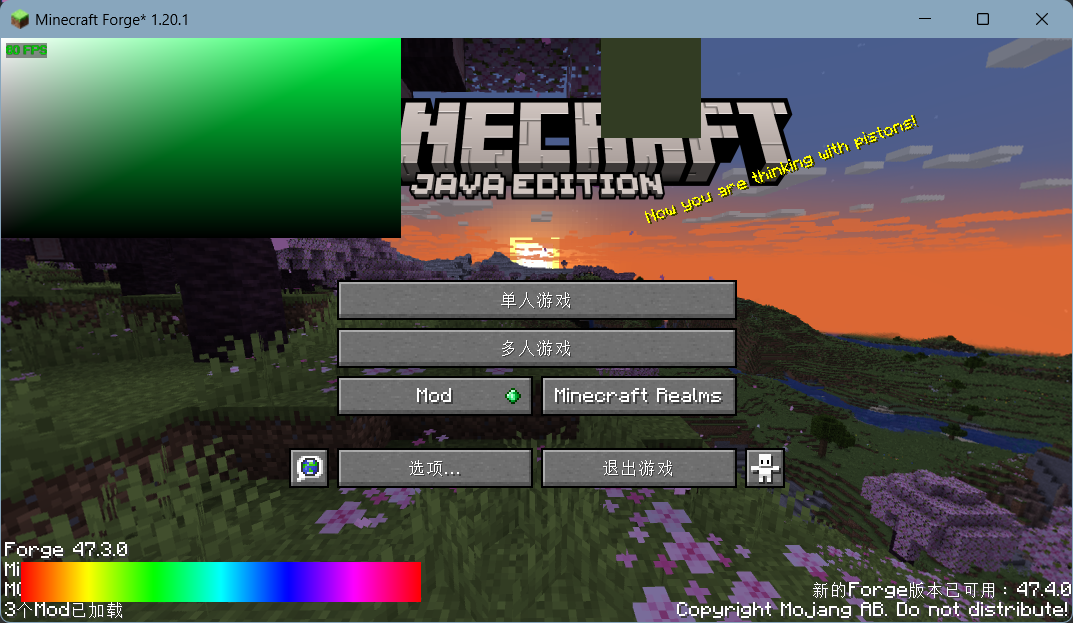
[原创][Mod]基于opengl取色的hsv色盘屏幕附上图片效果
-
[原创][Mod]基于opengl取色的hsv色盘屏幕直接上代码。
import com.mojang.blaze3d.systems.RenderSystem;
import com.mojang.blaze3d.vertex.*;
import net.minecraft.client.Minecraft;
import net.minecraft.client.gui.GuiGraphics;
import net.minecraft.client.gui.screens.Screen;
import net.minecraft.client.renderer.GameRenderer;
import net.minecraft.network.chat.Component;
import net.minecraft.util.FastColor;
import org.joml.Matrix4f;
import org.lwjgl.BufferUtils;
import org.lwjgl.opengl.GL11;

import java.awt.*;
import java.nio.ByteBuffer;

public class ColorPickerScreen extends Screen {
    private int pickColor = 0xFFFFFFFF;
    private int hueColor = Color.HSBtoRGB(0f, 1f, 1f);
    private double pendingMouseX = -1, pendingMouseY = -1;

    // 色板与色相条的位置/尺寸常量
    private static final int PANEL_X = 0, PANEL_Y = 0, PANEL_W = 200, PANEL_H = 100;
    private static final int HUE_X = 10, HUE_H = 20, HUE_W = 200, HUE_Y_OFFSET = 30;
    private static final int PREVIEW_X = 300, PREVIEW_Y = 0, PREVIEW_W = 50, PREVIEW_H = 50;
    private static final int HUE_SEGMENTS = 100;

    public ColorPickerScreen() {
        super(Component.literal("HSV Color Picker"));
    }

    @Override
    public void render(GuiGraphics guiGraphics, int mouseX, int mouseY, float partialTicks) {
        super.render(guiGraphics, mouseX, mouseY, partialTicks);

        Matrix4f mat = guiGraphics.pose().last().pose();
        Tesselator tess = Tesselator.getInstance();
        BufferBuilder buf = tess.getBuilder();

        RenderSystem.setShader(GameRenderer::getPositionColorShader);
        buf.begin(VertexFormat.Mode.QUADS, DefaultVertexFormat.POSITION_COLOR);
        drawColorPanel(mat, buf);
        drawHueBar(mat, buf);
        drawPreview(mat, buf);
        tess.end();

        // 在所有内容绘制完后再执行拾色
        handlePendingPick(guiGraphics);
    }

    @Override
    public boolean mouseClicked(double mouseX, double mouseY, int button) {
        this.pendingMouseX = mouseX;
        this.pendingMouseY = mouseY;
        return super.mouseClicked(mouseX, mouseY, button);
    }

    // === 私有封装方法 ===

    /** 绘制从黑→黑→选中色→白的渐变色板 */
    private void drawColorPanel(Matrix4f mat, BufferBuilder buf) {
        buf.vertex(mat, PANEL_X, PANEL_Y + PANEL_H, 0).color(0f, 0f, 0f, 1f).endVertex();
        buf.vertex(mat, PANEL_X + PANEL_W, PANEL_Y + PANEL_H, 0).color(0f, 0f, 0f, 1f).endVertex();

        float rHue = FastColor.ARGB32.red(hueColor)   / 255f;
        float gHue = FastColor.ARGB32.green(hueColor) / 255f;
        float bHue = FastColor.ARGB32.blue(hueColor)  / 255f;
        buf.vertex(mat, PANEL_X + PANEL_W, PANEL_Y, 0).color(rHue, gHue, bHue, 1f).endVertex();

        buf.vertex(mat, PANEL_X, PANEL_Y, 0).color(1f, 1f, 1f, 1f).endVertex();
    }

    /** 绘制水平色相条 */
    private void drawHueBar(Matrix4f mat, BufferBuilder buf) {
        int hueY = this.height - HUE_Y_OFFSET;
        for (int i = 0; i < HUE_SEGMENTS; i++) {
            float h1 = (float) i / HUE_SEGMENTS;
            float h2 = (float)(i + 1) / HUE_SEGMENTS;
            int c1 = Color.HSBtoRGB(h1, 1f, 1f);
            int c2 = Color.HSBtoRGB(h2, 1f, 1f);
            float r1 = ((c1>>16)&0xFF)/255f, g1 = ((c1>>8)&0xFF)/255f, b1 = (c1&0xFF)/255f;
            float r2 = ((c2>>16)&0xFF)/255f, g2 = ((c2>>8)&0xFF)/255f, b2 = (c2&0xFF)/255f;

            int x1 = HUE_X + i * HUE_W / HUE_SEGMENTS;
            int x2 = HUE_X + (i+1) * HUE_W / HUE_SEGMENTS;
            buf.vertex(mat, x1, hueY, 0).color(r1, g1, b1, 1f).endVertex();
            buf.vertex(mat, x2, hueY, 0).color(r2, g2, b2, 1f).endVertex();
            buf.vertex(mat, x2, hueY + HUE_H, 0).color(r2, g2, b2, 1f).endVertex();
            buf.vertex(mat, x1, hueY + HUE_H, 0).color(r1, g1, b1, 1f).endVertex();
        }
    }

    /** 在右侧绘制当前 pickColor 预览小矩形 */
    private void drawPreview(Matrix4f mat, BufferBuilder buf) {
        float r = FastColor.ARGB32.red(pickColor)   / 255f;
        float g = FastColor.ARGB32.green(pickColor) / 255f;
        float b = FastColor.ARGB32.blue(pickColor)  / 255f;

        buf.vertex(mat, PREVIEW_X,               PREVIEW_Y + PREVIEW_H, 0).color(r, g, b, 1f).endVertex();
        buf.vertex(mat, PREVIEW_X + PREVIEW_W,   PREVIEW_Y + PREVIEW_H, 0).color(r, g, b, 1f).endVertex();
        buf.vertex(mat, PREVIEW_X + PREVIEW_W,   PREVIEW_Y,             0).color(r, g, b, 1f).endVertex();
        buf.vertex(mat, PREVIEW_X,               PREVIEW_Y,             0).color(r, g, b, 1f).endVertex();
    }

    /** 处理 pendingMouseX/Y,进行边界检查并调用 glReadPixels 拾色 */
    private void handlePendingPick(GuiGraphics guiGraphics) {
        if (pendingMouseX < 0) return;

        // 边界判断:面板 或 色相条
        boolean inPanel = pendingMouseX >= PANEL_X && pendingMouseX <= PANEL_X + PANEL_W
                && pendingMouseY >= PANEL_Y && pendingMouseY <= PANEL_Y + PANEL_H;
        int hueY = this.height - HUE_Y_OFFSET;
        boolean inHue  = pendingMouseX >= HUE_X && pendingMouseX <= HUE_X + HUE_W
                && pendingMouseY >= hueY   && pendingMouseY <= hueY + HUE_H;
        if (!inPanel && !inHue) {
            pendingMouseX = pendingMouseY = -1;
            return;
        }

        // 计算 OpenGL 像素坐标
        double scale = Minecraft.getInstance().getWindow().getGuiScale();
        if (scale < 1) scale = 1;
        int px = (int)(pendingMouseX * scale);
        int py = (int)(pendingMouseY * scale);
        int glY = Minecraft.getInstance().getWindow().getHeight() - py - 1;
        guiGraphics.flush();

        ByteBuffer buf = BufferUtils.createByteBuffer(3);
        GL11.glReadPixels(px, glY, 1, 1, GL11.GL_RGB, GL11.GL_UNSIGNED_BYTE, buf);
        int r = buf.get(0)&0xFF, g = buf.get(1)&0xFF, b = buf.get(2)&0xFF;

        if (inHue) {
            hueColor = FastColor.ARGB32.color(255, r, g, b);
        } else {
            pickColor = FastColor.ARGB32.color(255, r, g, b);
        }

        pendingMouseX = pendingMouseY = -1;
    }
}
具体的注释都在代码里面了,一些魔法数字我也写成了字段。
项目地址在我的github仓库, 都是LGPLv3的代码 -
我喜欢你 -
已经,没有modding的理由了 -
我喜欢你 -
我喜欢你 -
我喜欢你

 🥵🥵🥵
🥵🥵🥵

